CAF Member - DoD Sponsored Position
-
Your Coverage
- TRICARE Prime equivalent - no enrollment fees, deductibles, or co-pays
- Primary care at the MTF
- NATO SOFA protection for healthcare access
Geographic Coverage Differences
Canada and the US have a Reciprocal Health Care Agreement that causes some minor variations on who is responsible to pay for types of care based upon the state you are located in. To clarify this, we break down into RHCA States and Non-RHCA States.
RHCA States
California, Hawaii, Maryland, Texas, Virginia, Washington State, and Washington D.C. are included within the RHCA between the DoD and DND.- Covered by TRICARE
- Inpatient care at Military Treatment Facilities (MTFs)*
- Outpatient care at MTFs
- Dental care at MTFs (to same extent as U.S. military)
- *Subsistence fees: You can expect ~$25/day for meals during hospital stays (TRICARE will not pay this fee). These items can be claimed through CF H Svcs Det Washington Team.
- Not covered by TRICARE
- Inpatient care at civilian hospitals. Member's will be Self-Pay and claim through CF H Svcs Det Washington.
Non-RHCA States (All other U.S. states)
- Covered by TRICARE
- Outpatient care at MTFs
- Outpatient care at civilian providers referred by MTF
- Dental care at MTFs
- Not covered by TRICARE
- Inpatient care billed at reimbursement rate claimed through CF H Svcs Det Washington Team.
- Inpatient care at civilian hospitals. Member's will be Self-Pay and claim through CF H Svcs Det Washington.
-
Registering for Care
Step-by-Step DEERS and MTF Registration Process
Information compiled from multiple project sources as noted belowPre-Registration Document Checklist
Required Documents:- Official posting message/orders (showing DoD sponsorship)
- Canadian military ID
- Valid passport
- Sponsorship letter (received upon arrival)
- Medical records from Canada (any you brought)
- Current medications list
- Dependant information - marriage and birth certificates
STEP 1: DEERS Registration
Where to Go- Personnel Office
- DEERS Office
- ID Card Facility
- Base Visitor Center (they can direct you)
When to Go
- Once you have received your sponsorship letter at posting
- Business hours (typically 0800-1600)
- Allow 1-2 hours for complete process
What Happens During DEERS Registration
- Information entered into DEERS system
- Eligibility verified for DoD benefits
- DoD ID card issued (photo taken on-site)
- Foreign Identification Number (FIN) assigned ⚠️ WRITE THIS DOWN - not printed on card but essential
Critical Verification Points:
- Correct Health Care Delivery Program (HCDP) Code: Members must be registered as HCDP 011 "Direct Care for CONUS DoD Affiliates." Dependents must be registered as HCDP 012 "TRICARE Standard for CONUS DoD Affiliates." The DoD ID will state "Foreign Affiliate Military" and on the back state "Outpatient Direct Care at no charge; inpatient direct care on a fully reimbursable basis."
- FIN recorded: This number is essential for verification of information in the future and not available on your card
STEP 2: MTF Registration
Where to Go
MTF Patient Administration Department
- Usually in main hospital/clinic building
- Ask at information desk if unclear
- May be called "Patient Registration" or "Enrollment"
When to Go
- After DEERS registration complete (must have DoD ID)
- Within first week of DEERS completion
- Allow 30-60 minutes
What to Bring
- DoD ID card (just received from DEERS)
- Medical records from Canada (any you brought)
- Copy of sponsorship letter (provided at duty location)
What May Happen During MTF Registration
- Registration paperwork completed
- Patient database enrollment
- Clinic assignment (rostered to clinic, not individual doctor)
- Local procedures briefing
- Appointment booking instructions
Key Information to Record
- MTF appointment line
- Patient Administration contact
- Emergency/After-hours number
- Your clinic assignment (if given)
Post-Registration Actions
Immediate Verification (Same Day)
- Test appointment booking (try to schedule routine appointment)
- When booking an appointment
- Save key phone numbers in phone
- Confirm all systems working correctly
Within One Week
- Schedule initial appointment with assigned clinic
- Set up MHS Genesis account (Important: It is recommended to only register and access MHS Genesis Portal from your home computer. Access can be problematic from a DWAN computer)
- Set up Humana or TriWest account this can be used to check referrals and download Explanation of Benefits (EOB)
Registration Complete Checklist
You can use this guide as verification that you have completed your registration to access care:DEERS Complete When You Have:
- DoD ID card in hand
- FIN numbers recorded
- All information verified correct with DEERS profile
MTF Complete When You Can:
- Successfully book appointments
- Access MTF pharmacy
- Contact clinic directly
- Log-in to MHS Genesis
- Log-in to Humana or TriWest account
- Explain coverage to outside providers
-
Prescription Coverage
MTF Pharmacy
- Always use MTF Pharmacy first
- Free for all covered medications
- Same formulary access as U.S. military
- No co-pays or restrictions
Off-Base Pharmacy
- To be used only when prescriptions not available on-base or you are not co-located within 50 miles of the nearest MTF
- No routine TRICARE coverage for off-base pharmacy for foreign military
- Contact CF H Svcs Det Washington Team if required to fill off base, ideally prior to filling prescriptions.
-
Referrals & Specialty Care
- Get a referral from MTF primary care - there is no coverage for self-referral to specialists
- Wait 72 hours - For referral manager approval
- Book with approved specialist - Follow referral instructions
- If you need to find your own specialist, you can look online for a TRICARE Network Provider using their search tool for you region
- TRICARE East Network Providers
- TRICARE West Network Providers
- Present DoD ID to specialist - No authorization needed once referred
-
Travel Coverage
Within the U.S.
- TRICARE Coverage follows you to any state
- Present DoD ID at any MTF or for emergency care
- RHCA vs Non-RHCA rules apply based on where you receive care
Outside the U.S.
- No TRICARE coverage outside U.S. borders
- Use Blue Cross for emergency medical coverage while traveling
-
Optometry Services
CAF members are generally only eligible to purchase eyewear every 2 years - any purchase made prior will not be reimbursable.
Procedure
- Log on to your Blue Cross Portal (www.medavie.bluecross.ca/myinfo) to determine when your last eyewear purchase was. You must purchase your new eyewear after 2 years has passed from the date listed in your portal.
- Contact the CFMLO for approval to purchase eyewear. Once approval is provided, you can purchase eyewear as per the approved amounts. Generally, there is no entitlement to purchase contact lenses.
- Submit claim (consisting of CFMLO approval, invoice, receipts and CF52 claim form) to the HS Med Admin inbox: CDLSW-MedicalAdmin-ELFCW-AdminMedical@forces.gc.ca.
Important
- Pers requesting any eyewear (i.e., regular glasses, sunglasses, BEW inserts, etc.) should read CF H Svcs Gp Instruction 4020-05 Optical Services first, and then follow up with the CFMLO.
- The entitlement is for 2-years despite lost/broken eyewear OR change in prescription. Only eligible eyewear will be reimbursed (as per ref).
- You are entitle to a max reimbursement of $600 CAD - members will be out of pocket for expenses beyond their entitlement.
- Members with access to an MTF shall use MTF optical services for eye exams. Members requiring civilian resources for optometry exams need justification and authorization from the CFMLO (or Tricare) prior to using civilian optical services.
-
Common Problems & Solutions
Problem: Provider doesn't recognize TRICARE participant status
Solution:- First, verify that your DEERS registration is correct
- Contact your local BCAC for provider education assistance
Problem: Unexpected bills or claim denials
Solution:- Contact local BCAC first - they're your best resource
- If unresolved, contact CF H Svcs HQ Det Washington Team
-
Important Information to Know
1. CAF Spectrum of Care
- The CAF Spectrum of Care defines what medical and dental services, treatments, and items will be provided at public expense to CAF members who demonstrate clinical requirements. Coverage is not like traditional insurance - you receive specific authorization for specific care based on clinical need. Read more about CAF Medical and Dental Benefits Information.
- This care is "Authorization-Based Coverage" - You will be approved for specific treatments (e.g., "10 sessions of physiotherapy") - If additional care is required beyond your authorization, you must request additional approval
- Coverage is based on clinical necessity and evidence-based medicine
- Tricare is independent of CAF Spectrum of Care; both are applicable.
2. What's NOT Covered:- Care outside CAF Spectrum of Care (unless using spouse's insurance)
- Experimental or investigational treatments
- Care while on unauthorized leave
- Cosmetic procedures (unless medically necessary)
- Concierge medicine services (boutique or premium healthcare services)
3. Financial Considerations- Coverage limited to reasonable and customary rates
- CAFMLO will advise on any specific financial limits during authorization
- Some specialized treatments may require additional approval for costs
4. Advances- Healthcare in the US is expensive. As you receive estimates or are planning care, we can issue advances for any combined amount over $400 to help reduce individual financial burden while awaiting claims and reimbursement.
- The process for requesting an advance can be found in the Forms Repository.
Medical Administration Guide
This outlines the processes for medical administration that is required by all CAF members posted OUTCAN to the United States regardless of position.
-
Annual Medical Readiness Verification - An Overview
Non-Aircrew or Aircrew in non-flying/controlling positions
What is the Annual Medical Readiness Verification?
- This is a required process as part of your APRV and is being used to replace the old PHA system. This will enable more frequent and easier medical updates along with ensuring that appropriate medical care and screening is being done for CAF Members across the United States.
- It will involve the complete of a Annual Medical Readiness Verification (AMRV) form and a Personal Health Questionnaire (DND-4943) to be submitted along with your medical records that have not been submitted for that year.
- The process for this readiness verification is:
- Collect all U.S. medical records for submission.
- Complete the AMRV and DND 4943 forms, available in the form repository.
- Submit the medical records, questionnaire, and AMRV to medical records for review.
What happens after submission?
- CFMLO reviews all your medical records from the past year to:
- Assess your current health status
- Identify ongoing health issues needing additional care
- Determine preventive care needs
- Apply work limitations if needed (called MELs)
- Update your medical category if needed
- Contact the member to coplete the review
- Medical coordinator will sign off the medical section of the APRV once submitted.
Annual Aircrew Medical Submission
Active aircrew (those who are in flying or controlling positions) are usually familiar with timelines for Type 1 or Type 2 aircrew medicals, the details of which are outlined in AMA Directive 100-01 Medical Standards for CAF Aircrew. However, aircrew posted to the USA for greater than 2 years in non-flying/non-controlling positions can waive aircrew medicals and revert to a Non-Aircrew PHA (see above). All aircrew were required to have a valid Type 1 Aircrew Medical Exam prior to departure from Canada.
Aircrew who are actively flying or in controlling positions
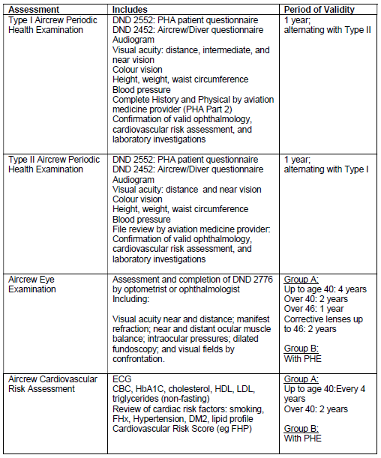
While US Flight Med clinicians clear CAF members to fly/control according to US policies (usually through issuance of a DD2992 Medical Recommendation for Flying form), Aircrew PHAs must also be conducted in order to maintain a valid medical category, with particular attention to the Air Factor. This Air Factor can be maintained on the timeline of their DD2992 Medical Recommendation for Flying form. When scheduling your Aircrew medical, it is important to follow these steps:- Aircrew should request specific examinations based on the Period of Validity found in the table below; if there are questions on what is required, aircrew can reach out to the CAFMLO for clarification on specific exam requirements.
- Once you know what examinations are required, contact your clinic to schedule a complete medical (head-to-toe exam), vision testing (must have numbers, ie 20/20, indicating visual acuity), audiogram (must have frequencies and decibels), and any investigations the CAFMLO indicated you require.
- Aircrew are to complete the DND2452 and DND2552 medical questionnaires, available in the Forms Repository
- After all appointments are complete, send the clinical notes, DND 2452, and DND2552 to the Medical Records Clerk or CAFMLO (encrypted via email, via DoD Safe, or fax) in order to have your medical category updated.
The USAF may complete a DD 2992 form at this medical. Submissions consisting solely of DD 2992s are not sufficient. The CAFMLO does not require the 2992 form.
-
What You Must Report to CAFMLO
New Medical Diagnosis
- New chronic health diagnosis (i.e. hypertension, diabetes, high cholesterol)
- New physical health diagnosis (i.e. degenerative disc, chronic low back pain, major muscle or joint issue like ACL, hip arthritis)
- New mental health diagnosis (i.e. depression, anxiety, PTSD, substance use disorders)
- New long-term medication or medication change.
- Non self-limiting conditions (i.e not viral illnesses)
Injuries & Physical Issues
- Any injury taking more than 2 weeks to heal
- Any discussion about surgery (even future surgery)
- Service-related injuries (including PT injuries)
- Cannot perform any part of your job due to illness/injury
Medical Tests & Procedures
- Blood work and laboratory tests
- X-rays, CT scans, MRIs
- Colonoscopy or other screenings
- Any diagnostic imaging studies
-
Medical Screening for Cross-Posting or Extension
There are three different screening scenarios for members that are OUTCAN USA. Each scenario has different requirements and steps, but all of them will engage the CF H Svcs HQ Det Washington team. Your orderly room will initiate the DND 4064 OUTCAN Posting Screening Checklist.
Initial steps that are required for all screenings:- Review and submit your Annual Medical Readiness Verification along with all US Health Records and a copy of your screening message.
- Complete an Annex B Form
- Complete the DND 4342 parts 1 and 2 for each dependant*
- *For cross-posting to Rest of World, Part 3 needs to be signed by their regular clinician.
- Send the AMRV, health records, Annex B form, and copy of screening message to Natalia Pela to create your screening file.
- Screening for an extension or cross-posting in same geographic location:
- CFMLO is the approving authority.
- SW Screen may be required based upon review by CFMLO.
- Phase 1 Part 8 form to be signed off by Med Records Clerk.
- Phase 2 to be signed off by CFMLO upon completion of screening.
- Screening for a cross-posting within the USA
- CFMLO is the approving authority.
- SW Screen will be required and scheduled by Med Records Clerk.
- Phase 1 Part 7 form to be signed off by CFHS Social Worker who completes the screening.
- Phase 1 Part 8 form to be signed off by Med Records Clerk.
- Phase 2 form to be signed off by CFMLO upon completion of screening.
- Screening for a cross-posting to a different country.
- All steps in the OUTCAN screening process are required, including Dental Screen (to be completed locally) and immunization screen (to be scheduled by Med Records Clerk).
- SW Screen will be required and scheduled by Med Records Clerk.
- DND 4342 Forms need to be completed and signed Part 3 by local clinician.
- CFMLO will be a reviewing clinician, D Med Pol is the final authority.
** Note: all screenings require complete submission of US Medical Records for the member, along with either Aircrew Medical if actively flying or Annual Medical Readiness Verification submission. All forms are available in the Forms Repository. -
Medical Employment Limitations (MELs)
When MELs Are Applied
CAFMLO applies work limitations when you:- Have medical conditions affecting job performance
- Need accommodations or restrictions
- Require modified duties during recovery
MEL Process:
- CAFMLO Assessment - Reviews medical information submitted via clinical notes and discussion with the member. MELs provided by US Clinicians should be honored pending review by CFMLO.
- Limited Applied - Specific work restrictions documented and sent to the member along with uploaded into MonitorMass.
- Chain of Command Notified - Member notifies Chain of Command of MELs, if there are any questions for guidance Chain of Command can reach out to CFMLO.
- Regular Review - MELs reviewed and updated as needed
-
Submitting Medical Records
Clinical notes generated from US medical providers, whether DoD or civilian, must be provided to the Medical Records Clerk for upload into CFHIS. There is a duty to report all medical care outside of Canadian Forces Health Services clinics.
Due to medical privacy laws here, the CF H Svcs HQ Det Washington team cannot request these records from the US; they need to be released by the member.
It is important to keep your medical file as up to date as possible to ensure that you are fit for your duties, to enable guidance on medical conditions, to enable potential future benefits reviews if service-related conditions arise, and to allow for effective transfer of care when posted back to Canada.
Clinical notes contain the actual assessment and diagnosis as provided by your clinician, not just the discharge instructions, medical employment limitations, or fitness to fly chits.- To submit your clinical notes, you can:
- Send an email to Med Records Clerk at Natalia.Pela@forces.gc.ca. This should ideally be encrypted but all unsecured medical information is secured immediately upon receipt.
- Have the records sent by Fax to 1-202-448-6438
- Arrange a DoD Safe link of your medical file for Medical Records at the MTF.
- Mail: CF H Svcs HQ Det Washington, 501 Pennsylvania Ave NW, Washington, DC 20001
- To submit your clinical notes, you can:
